

In-flight message Moderation extension allows you to moderate messages manually.Documentation Index
Fetch the complete documentation index at: https://cometchat-22654f5b-release-ios-chat-uikit-v5-1-2.mintlify.app/llms.txt
Use this file to discover all available pages before exploring further.
Settings
- Login to CometChat and select your app.
- Go to the Extensions section and enable the In-flight moderation extension.
-
Open the Settings for this extension and set the following:
-
Moderation Criteria
- Moderate all the messages
- Moderate only one-on-one messages
- Moderate only Group messages
- Moderate messages sent BY certain users (Comma-separated UIDs).
- Moderate messages sent TO ceratin users (Comma-separated UIDs).
- Moderate messages sent TO a certain groups (Comma-separated GUIDs).
-
Moderation Criteria
How does it work?
Once the extension is enabled and the settings are saved, navigate to the In-flight Message Moderation section of the Dashboard to manually moderate messages: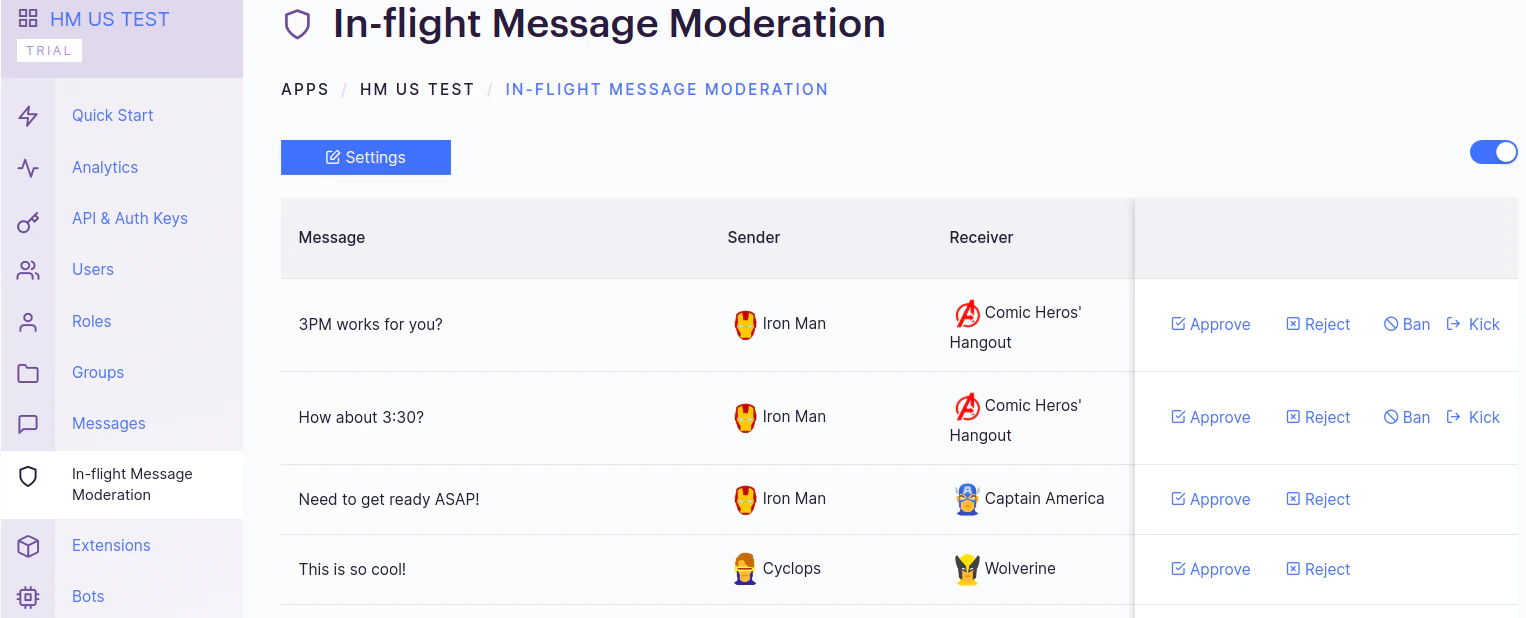
- Approve: The message gets sent to the Receiver and disappears from the list.
- Reject: The message gets deleted and is not sent to the intended receiver.
- Kick: Available for Group conversations. A notorious user gets kicked out of the group. They can rejoin the group.
- Ban: Available for Group conversations. A notorious user gets banned from the group. They cannot rejoin later unless they are unbanned.