

Documentation Index
Fetch the complete documentation index at: https://cometchat-22654f5b-release-ios-chat-uikit-v5-1-2.mintlify.app/llms.txt
Use this file to discover all available pages before exploring further.
Prerequisites
- CometChat app (App ID, Region, Auth Key).
- Chat Widget variant (will produce a Widget / Variant ID).
- A running Mastra agent endpoint (public or tunneled URL).
- Mastra Agent ID (e.g.
chef) and any required API key(s). - (Optional) Frontend Action definitions if you want UI‑bound behaviors.
Step 1 - Create / Verify Your Mastra Agent
Have a Mastra project ready (example using the “Chef” agent):Minimal example (tools + agent)
Minimal example (tools + agent)
Local run & test
Local run & test
- Agent ID (e.g.
chef) - Base URL (e.g.
http://localhost:4111/apior public tunnel)
Step 2 - Deploy / Expose Your Agent
Choose one path so the Dashboard & Widget can reach your Mastra endpoint.Option A: Quick tunnel (development)
Option A: Quick tunnel (development)
Install a tunnel & expose port 4111 (pick one):Copy the public HTTPS URL (e.g.
https://abc123.ngrok.io) – this becomes your Deployment URL.Option B: Vercel serverless (Edge/Node)
Option B: Vercel serverless (Edge/Node)
Project structure (excerpt):Example handler:Deploy:Use the deployed base URL (e.g.
https://your-app.vercel.app/api).Option C: Docker container
Option C: Docker container
Add a simple Express server & Dockerfile:Build & run:
Optional: Security hardening
Optional: Security hardening
- Add an auth layer (Bearer token) that the Dashboard/Widget includes.
- Enable basic rate limiting (e.g. 60 req/min per IP).
- Log tool invocations (duration + errors) for observability.
For fastest iteration start with a tunnel, then move to serverless or container for staging/production.
Step 3 - Configure in CometChat
Open Dashboard
Open the CometChat Dashboard.
Step 4 - Attach Agent in UI Kit Builder (No‑Code)
Step 5 - Frontend Actions & Tools (Optional)
Step 6 - Customize in UI Kit Builder
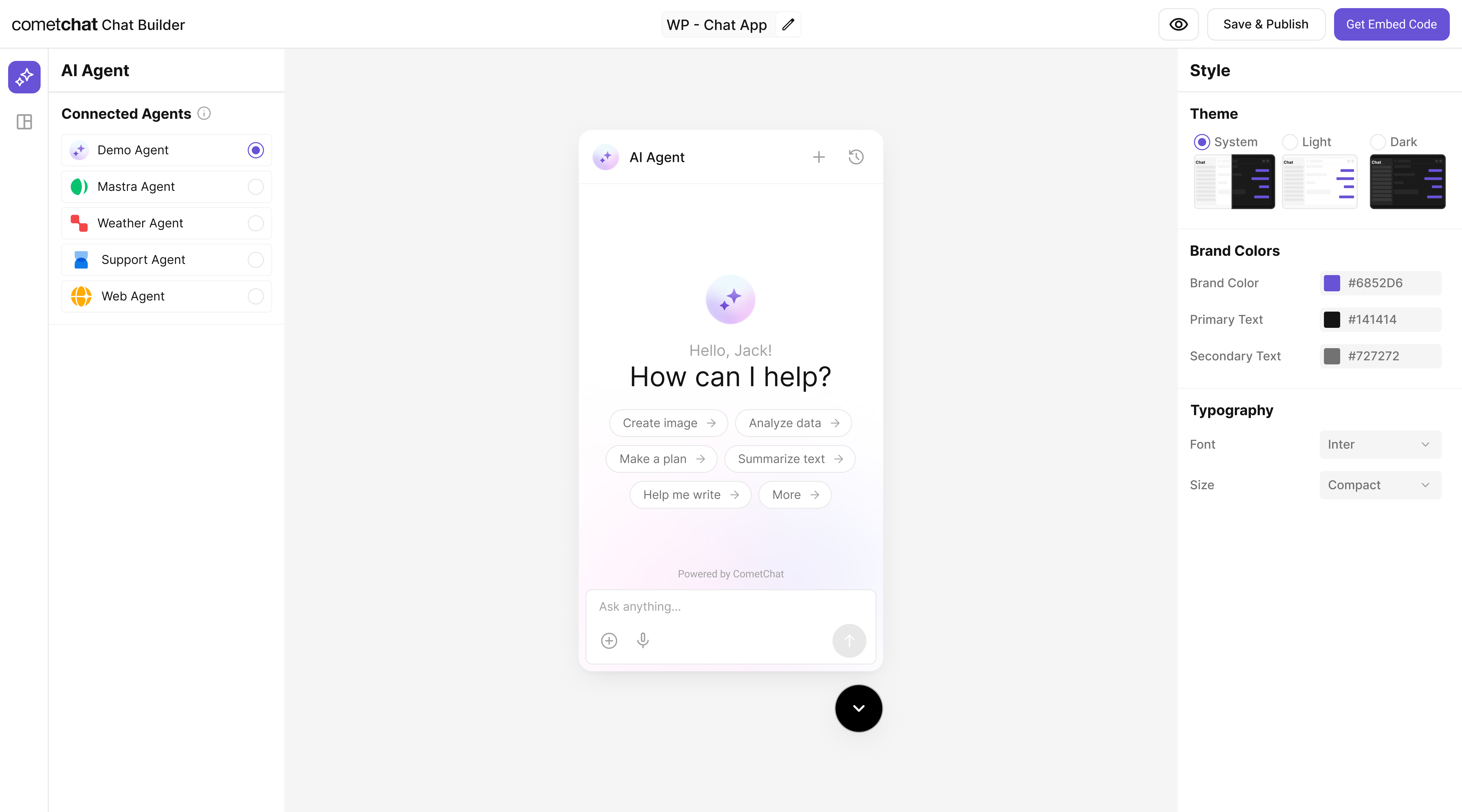
Step 7 - Export & Embed
In UI Kit Builder click Get Embedded Code → copy credentials:- App ID
- Auth Key
- Region
- Variant ID
Replace placeholders (<YOUR_APP_ID>, etc.) with real values.
Step 8 - Verify
| Check | How |
|---|---|
| Agent appears | Open widget → new conversation / agent entry available |
| Basic reply | Send a prompt → response under a few seconds |
| Tool logic works | Ask for ingredient substitution / recipe (Chef example) |
| Error free | Browser console + Mastra logs have no unhandled errors |
If responses fail, confirm the endpoint is publicly reachable and the Agent ID matches the Dashboard configuration.
Troubleshooting
| Issue | Fix |
|---|---|
| Agent not listed | Confirm it’s enabled in Dashboard + variant saved |
| 404 from Mastra | Endpoint path or agent key mismatch |
| Timeout | Expose via a tunnel or deploy to a public host |
| Tool not invoked | Ensure tool ID referenced in agent instructions & code |
| Auth error | Re-check Auth Key / App credentials in embed snippet |
Next Steps
- Add more tools (search, summarization, domain knowledge).
- Introduce Frontend Actions for richer UI control.
- Move from tunnel to production deployment.
- Add analytics / observability (latency, error tracking).